Transforming passive streaming into a social experience

UX/UI TV & mobile App design
Project
Kibitz
devices
TV & mobile App
Role
UX/UI designer
Category
Streaming
Social
CHALLENGE
Watching streams with friends should be simple, yet current tools make it frustrating. Sync issues, fragmented apps, and limited interaction leave users relying on makeshift solutions like Discord screen-sharing. On mobile or TV (where most casual viewing happens) co-watching becomes even harder.
At the same time, today’s audiences want streaming to feel communal, not isolated. They want real-time reactions, private group viewing, and easy ways to follow multiple streamers. Kibitz was created to turn passive, solitary streaming into a seamless shared experience.
research
Gen Z’s streaming habits showed a strong desire for connection: over 85% use their phone while watching TV, mainly to chat or look up related content. Yet attempts to co-watch today rely on workarounds like Discord, which suffer from desync, technical friction, and the need to switch between multiple apps or need multiple subscriptions. Users want to share reactions in real time, watch in private groups, or follow multiple streamers at once, but current platforms make this difficult, fragmented, or impossible.
The research revealed a clear gap for a dedicated, frictionless co-watching experience. Users need reliable synchronization, built-in communication, and a single space where watching and socializing coexist naturally. By addressing both the psychological need for shared connection and the technical limitations of existing solutions, Kibitz can transform solitary streaming into a smooth, communal experience.
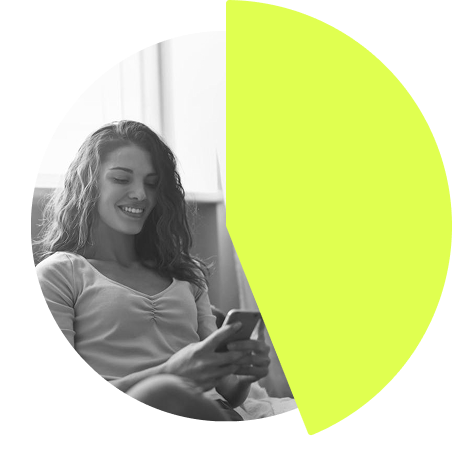
89% of Gen Z use their smartphone as a "second screen" while watching TV

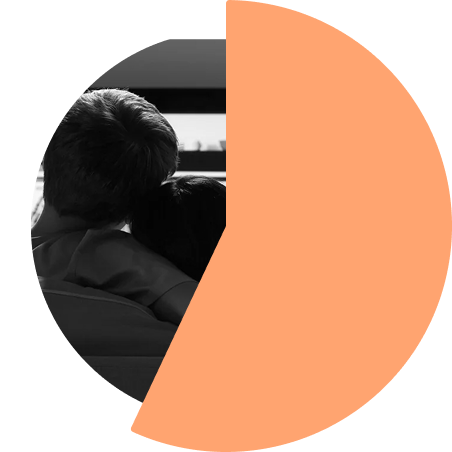
47% of all streaming is already "co-viewed" (watched with someone else), but this is currently limited to people in the same room

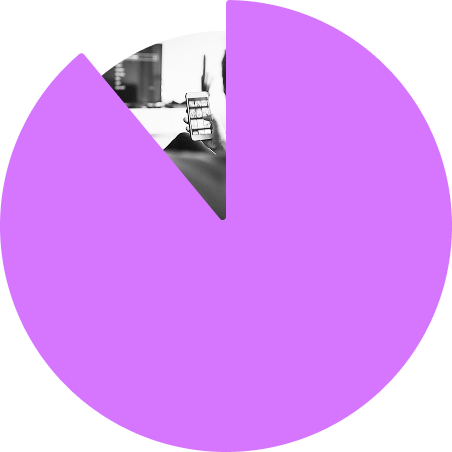
44% of Gen Z respond to a message within one minute of receiving it while watching content. Showing that real-time social interaction is already happening, just in a fragmented way

KEy goals
Make co-watching seamless and intuitive
Eliminate friction by ensuring synchronized playback, easy communication, and simple switching between streamers or friends.
Bring genuine social connection into streaming
Enable reactions, multi-stream viewing, and deeper interaction between streamers and viewers. Making streams feel alive, communal, and fun.
Express the culture and community of streaming
Develop a visual identity inspired by memes, stickers, and online subcultures, capturing the playful, ever-changing language of streaming communities.
results
A truly social streaming experience
Kibitz enables users to call friends directly within the platform, watch multiple streamers at once, and switch seamlessly between views. The phone becomes a dynamic companion to the TV: chatting, reacting, and interacting without interrupting the content.
Refined navigation through usability testing
Usability testing revealed issues typical of TV interfaces: difficulty navigating with remotes, unclear status states, and inconsistency between pages. Iteration led to change the navigation to a new sidebar navigation for easier access, clearer live-status indicators on channels, more consistent layouts between home and content pages and improved button hierarchy and focus states tailored for TV.
A playful, community-driven visual identity
The identity embraces the fun, chaotic personality of streaming culture. Stickers reflect evolving memes and community reactions, creating a visual language that feels alive and constantly updated. The result is a platform that feels social, vibrant, and unmistakably tied to the culture of streaming.
Conclusion
Kibitz transforms streaming into a shared experience, making it easy for friends to watch, react, and connect in real time. It bridges the gap between solitary consumption and social interaction, supporting everything from private group watch nights to multi-stream events.
The biggest insight came from usability testing: designing for TV requires rethinking navigation, focus states, and clarity. Improving the interface for remote navigation and unifying page structures created a much smoother, more intuitive experience.